

| exodus |
Home |
Overview lecture |
Capabilities |
Projects |
Publications |
Animations |
News | Press releases | Leaflets | Team | Visitor registration | Demo software | Licensed Users Area | Contact details |
EXODUS MODEL BRIEFLY EXPLAINED
EXODUS comprises five core interacting submodels, the Occupant, Movement, Behaviour, Toxicity and Hazard submodels (see below). The software, written in C++ using Object Oriented techniques, comprises a set of rules or heuristics which define the function of each submodel. Using these rules, EXODUS tracks the trajectory of all individuals as they make their way out of the enclosure or are overcome by the fire hazards such as heat and toxic gases.
The spatial and temporal dimensions within EXODUS are spanned by a two-dimensional
spatial grid and a simulation clock (SC). The spatial grid maps out the geometry of
the structure, locating exits, internal compartments, obstacles, etc. Geometries
with multiple floors can be made up of multiple grids connected by staircases, with each
floor being allocated a separate window. The structure layout can be specified using
either a DXF file produced by a CAD package, or the interactive tools provided, and may
then be stored in a geometry library for later use. The grid is made up of nodes and
arcs with each node representing a small region of space and each arc representing the
distance between each node. Individuals travel from node to node along the arcs. The
escape strategy (Behaviour submodel) chosen by each individual is a product of their
interactions with the enclosure, other occupants and any fire hazards present.
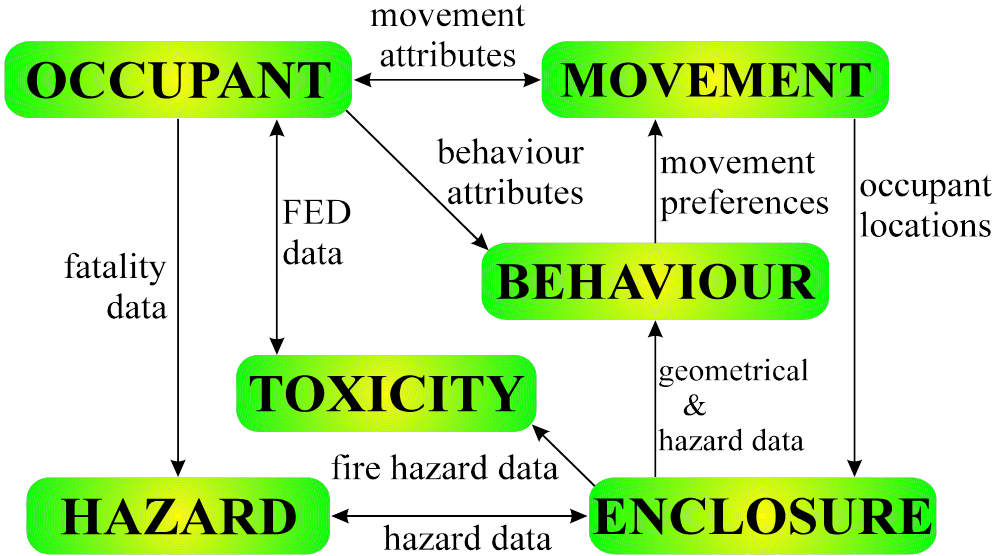
Movement Submodel
Controls the physical movement of individual occupants from their current position to the most suitable neighbouring location, or supervises the waiting period if one does not exist. The movement may involve such behaviour as overtaking, side stepping, or other evasive actions.
Behaviour Submodel
Determines an individual's response to the current prevailing situation on the basis of their personal attributes. The submodel passes this decision on to the movement submodel. The behaviour submodel functions on two levels, global and local. The local behaviour determines an individual’s response to their local situation, while the global behaviour represents the overall strategy employed by the individual. This may include such behaviour as, exit via the nearest serviceable exit or most familiar exit.
Occupant Submodel
Describes an individual as a collection of defining attributes and variables such as gender, age, max running speed, max walking speed, response time, agility, etc. Some of the attributes are fixed throughout the simulation while others are dynamic, changing as a result of inputs from other submodels.
Hazard Submodel
Controls the atmospheric and physical environment. It distributes pre-determined fire hazards such as heat, smoke and toxic products throughout the atmosphere and controls the opening and closing of exits.
Toxicity Submodel
Determines the effects on an individual exposed to toxic products distributed by the
hazard submodel. These effects are communicated to the behaviour submodel which, in
turn, feeds through to the movement of the individual.
VALIDATION
Validation of computer models should not be considered as a “once and forget” task.
It should be delt with in a systematic and graduated approach that involves,
(i) component testing,
(ii) functional validation,
(iii) qualitative validation and
(iv) quantitative validation.
Viewed in this manner, validation is considered an on-going activity and an integral part of the life cycle of the software. While the first three components of the validation protocol pose little or no significant problems, the task of quantitative validation poses a number of challenges, the most significant being a shortage of suitable experimental data.
The EXODUS suite of evacuation models has and is undergoing this process of validation. The quantitative validation is based on predictions made using EXODUS for several full-scale evacuation experiments. Several documents have been produced describing the validation process used with EXODUS. These publications can be found on our publications pages. Amongst other publications, Interested readers should view papers 106, 111 and 112.
CAPABILITIES
EXODUS software capabilities include:
 Simulates evacuation and
circulation pedestrian dynamics.
Simulates evacuation and
circulation pedestrian dynamics.
Can simulate the interaction of many
thousands of people
- Examples include:
- 25,000 people in 110 storey high-rise building
- 125,000 people in city square
SHORT RUNTIMES: Example runtime
performance
- 30,000 agents, 60,000m2 enclosure, 5.9 min using 3.3GHz, 8Gb PC
- 8,100 agents in 50 storey building, 25 min using 3.3GHz, 8Gb PC
Ability to represent agent
interaction with lifts, escalators and stairs
Ability to represent agent interaction with ticket gates
Ability to distinguish emergency exits from normal exits
Ability to represent service queues
Can assign exit usage according to occupant familiarity.
Simulates agent interaction with signage.
Can represent group dynamics.
Ability to specify both internal and external exits.
Itinerary function enabling allocation of tasks to individuals
Determines time spent in congestion for each agent.
Census nodes/lines/regions allows collection of flow statistics at any
arbitrary point or region within the structure.
Link to SMARTFIRE CFD fire simulation output files
Reads CFAST history files
Toxicity calculations determined using FED models.
- Agent interaction to:
- Convective and radiative heat
- Toxic
gases
- Irritant gases
Agent interaction with
smoke (low visibility) including crawl capability.
Run-time 2D graphics:
- can display individual agents and population
densities,
- can display smoke and temperature distribution,
-
allows agent interrogation during simulation.
Run-time 3D graphics:
- can display operation of lifts and movement of
agents between floors
- can display both population density and
individual visualisation modes available.
vrEXODUS post-processing
Virtual Reality animation tool.
- allows rapid 3D visualisation of very large
data sets,
- can display spread of fire hazards,
- allows
different camera views to be specified,
- enables the generation of
WMV movies.
askEXODUS is a tool
designed to assist in the analysis of large data output files produced
from multiple runs. Batch
Mode allows rapid execution of multiple runs.
Interactive help facility.
SPECIFICATION/REQUIREMENTS/PROCEDURES
MS WINDOWS including XP, VISTA, 7,
8 and 10, in both 32 and 64 bit versions.
- minimum recommended requirement: P4 1.5 GHz, 1 GB RAM
UPGRADE PATHS AVAILABLE
GRAPHICAL INTERFACE ALLOWS USER TO
MONITOR PROGRESS OF EVACUATION
VIRTUAL REALITY PLAY BACK
CAPABILITY PROVIDED WITH vrEXODUS (LEVEL B and C SOFTWARE ONLY)
BATCH MODE OPERATION ALLOWS RAPID
PROCESSING OF PRODUCTION RUNS
INTUITIVE USER INTERFACE
GEOMETRY EDITOR AND LIBRARY
Allows the user to construct the enclosure. Several methods are available
(a) the enclosure can be manually constructed using the interactive tools
provided,
(b) imported from a variety of different Third Party Applications
such as:
- CAD systems i.e. .DXF,
- BIM (Building Information Modelling) i.e. .IFC,
- SMARTFIRE CFD geometries i.e. .SMF
- FDS CFD geometries i.e. .FDS.
(c) loaded from a library case.
Procedure also automatically identifies maximum travel distance.
POPULATION EDITOR AND LIBRARY
Generates the group of occupants to be used in the analysis. As in the Geometry
mode, interactive tools are provided to assist with population definition.
Entire populations or subgroups of people can also be stored and recalled from a
user-defined library.
SCENARIO EDITOR
Control scenario specifics such as exit capabilities, exit potentials, fire
hazards etc. Fire hazards (heat, smoke and toxic gases) can be defined using
CFAST generated history files or SMARTFIRE simulation files. The evolution of
the fire scenario can be depicted in Simulation Mode through the contouring
graphic option.
FIRE HAZARD EDITOR AND LIBRARY
Provides choice of two FED toxicity models. Manually created fire atmosphere
data (e.g. derived from either experimental data or fire models) can be edited.
SIMULATION MODE
Allows simulation to be run in either interactive or batch mode. In interactive
mode, two-dimensional animated graphics are generated as the software is
running. This allows the user to observe the evacuation as it takes place. In
this mode the simulation can be replayed, paused and a shuttle facility is
provided to allow the user to step through the simulation a time step at a time.
It is possible to view simulation in individual agent mode (so that each agent
is displayed) or in population density mode, where a dynamic colour map of the
population density is displayed. The graphics are interactive allowing the user
to interrogate agents and events. A range of scenario specific data (both input
and output data) can be saved into spread sheet-style output files for later
interrogation.
OTHER FEATURES
To aid in the interpretation of the results produced by EXODUS several data
analysis tools have been developed. These are intended to be used once a
simulation has been completed and enable large data output files to be searched
and specific data selectively and efficiently extracted (askEXODUS). In
addition, a post-processor virtual-reality graphics environment has been
developed (vrEXODUS), providing an animated three-dimensional representation of
the evacuation. Using vrEXODUS it is possible to create WMV animations of the
simulations using a variety of different camera view points to highlight
important aspects of the simulation.